Open the activity in your Moodle course or use the QR code displayed by the teacher. If no session is running, a waiting screen shows the next scheduled session date, if one exists.
If you stay on that screen, you will enter automatically when the session starts. In a manual session, you wait for the teacher to launch the questions; if it is already underway, you join at the current point.

Read the question and answer within the available time. True/false and single-answer multiple-choice questions submit when you select an option; other types require submission confirmation. When time runs out, the content currently on screen is submitted.
A submitted answer is locked. In manual progression, wait for the teacher to move on; in scheduled progression, use the next-question button and complete the session at your own pace.
Avoid switching tabs or reloading during a question: KUET may attempt to submit your answer when focus is lost. The document describes this behaviour as experimental and browser-dependent.
In teams, the first answer from a member counts for the whole group. Agree on the answer before submitting.
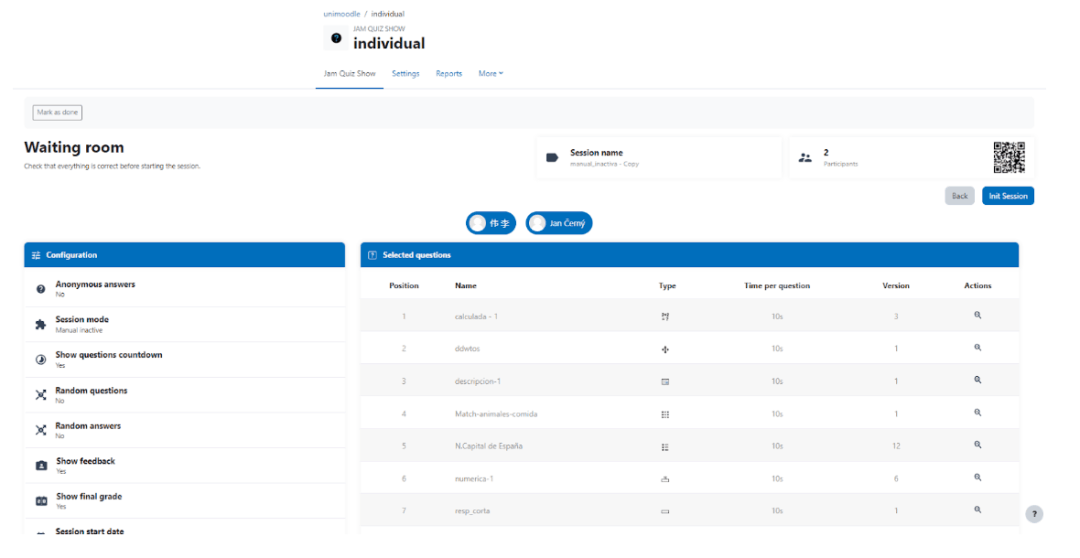
Start a prepared session from the dashboard. In the waiting room, check participants and questions and select “Start session” when ready. Only one teacher can lead it.

When no question is running, select “Improvise”, enter a prompt and optionally add the first tag. Once launched, students contribute words and repeated words appear larger.
You can remove tags and open a vote using “Vote”. Word sizes then reflect votes. Select “Next” to return to the session flow.
Join during the availability window and use the next-question button to advance. You can leave and continue on another device while the session remains open: your progress and the random question order assigned on first entry are preserved.
Each question can be answered once. After completing them all, wait until the session ends to view the report. The teacher can monitor progress and end the session before its scheduled end time.
If the teacher loses connection during a manual session, students are disconnected and notified. As long as the session has not ended, the teacher and students can reconnect. The teacher uses “Jump” to return to the previous point.
Saved answers are preserved and cannot be repeated unless the teacher resets that question. Late arrivals join the current question and cannot answer earlier ones unless the teacher returns to them. If a student joins on multiple devices, only the latest connection remains active.
A finished session cannot be reopened or restarted: duplicate it to run it again. Its grade enters the gradebook only if both the activity and session are graded.
Access results from the Reports tab, the link shown at the end, or the completed sessions dashboard. Reports can be downloaded in formats enabled in Moodle.
Students can only view their own report and answers. Teachers can review participant reports, but viewing answers marked anonymous requires mod/kuet:viewanonymousanswers.
